


Recipe Keeper
4.73.76K Reviews
App Specs
- Version
- 3.46.1.0
- Updated On
- License
- Free
- Downloads
- 1,000,000+
- Developer
- Tudorspan Limited
- Categories
- Food & Drink
- Platform
- Android, iOS
Screenshots
 Analysis by AppCompare
I tend to notice friction in a recipe app before I notice its extras: how much effort it takes to get a recipe in, whether I can find it again, and what happens when dinner plans change. Recipe Keeper is aimed at bringing those pieces together, but it works best when I treat it as a personal recipe library that needs a little care, rather than expecting every imported recipe or plan to be perfect automatically.
Where getting started can snag
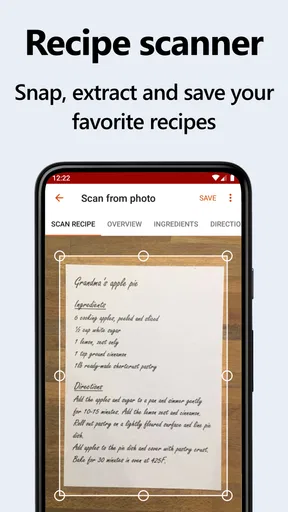
The first hurdle is deciding how much of an existing recipe collection to move over. If you have years of bookmarks, screenshots, handwritten notes, and saved social posts, importing everything at once can turn setup into a project. I’d start with a small group of meals I actually cook, then add older recipes as they become relevant. That gives the collection useful shape from day one without making the app feel like another chore.
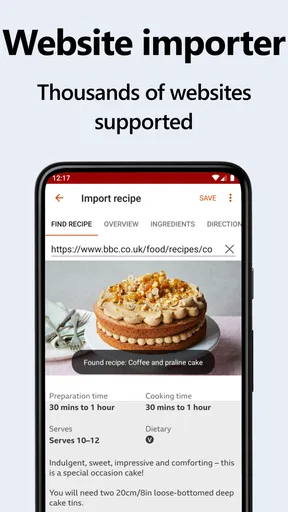
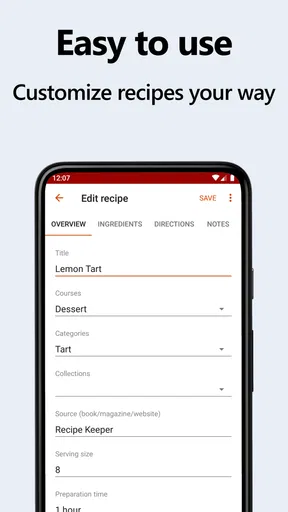
Website importing is convenient when a recipe page is structured clearly, but recipes online vary. A page may mix a long introduction, substitutions, and several recipe variations; an import may need a quick check before you rely on it. I make a habit of reviewing the ingredient list and method after bringing in a recipe, especially if I plan to cook from it that evening. For a family recipe or a version I have adapted over time, manual entry can be more reliable because I can preserve the details that matter to me.
Small setup checks that pay off
Collections and tags are most helpful when they answer different questions. I use collections for broad groups—such as weeknight dinners or baking—and tags for qualities that cross those groups, like vegetarian, freezer-friendly, or quick to prepare. The exact labels are personal, but keeping the system simple makes searching easier. If every recipe gets a long list of tags, choosing the right one later becomes its own task.
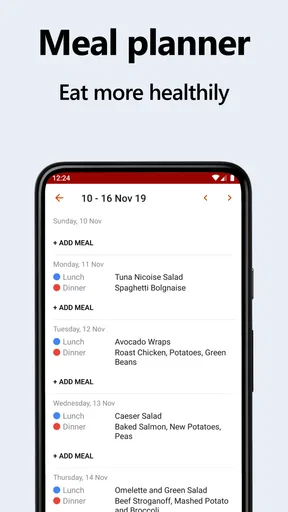
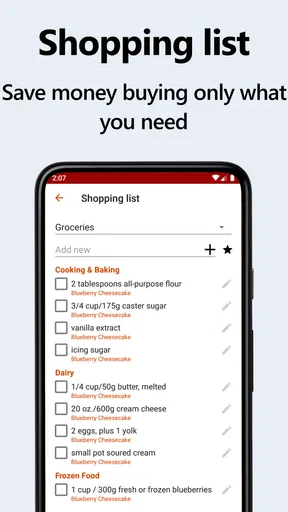
Before building a full week around the meal planner, I’d test the process with one meal and inspect the shopping list it creates. Check that the recipe has the ingredients you expect and that you recognize the list’s entries when shopping. This is particularly useful for recipes you have edited or entered yourself: the planner can only work with the information attached to the recipe. A quick review is easier than discovering a missing staple halfway through cooking.
Recovering when plans change
Meal plans are intentions, not obligations. If a busy day pushes dinner to tomorrow, I find it more practical to move the recipe and revisit the shopping list than to keep following an outdated plan. I also avoid treating the list as a perfect inventory of my kitchen. It helps me remember what a planned recipe calls for, but I still check cupboards and the fridge before buying, so I don’t come home with duplicates.
When something seems out of date across devices, I first check that I’m using the same account or sync setup on each one and that the device has a working connection. I’d also reopen the app and give it time to update before making the same edit repeatedly. With any synced collection, duplicate changes can make it harder to tell which version is current. For important recipes, keeping a copy of especially valuable family notes outside the app is a sensible extra safeguard.
Worth Reading Before You Choose

EA SPORTS FC Mobile 26 Is a Bigger Football Game, but It Takes Time

Flipboard Shows What News Apps Must Do Beyond the Feed

Switching to Android Auto Means Rethinking Your Driving Routine

Google Calendar Makes a Crowded Week Easier to Manage

Ludo King Makes the Most of the Minutes Between Plans

Baby Panda World Brings Quick Play to Modern Phones, but Its Game Library Feels Busy
When the problem is elsewhere
Not every confusing result means the app has lost information. A recipe may be filed under a different collection than expected, or a tag may not match the word I am searching for. I check those first, then look at the recipe itself to see whether its title and ingredients were captured as intended. A consistent naming habit—especially for variations such as “lentil soup, mild” and “lentil soup, spicy”—can make a growing collection easier to navigate.
The wider context matters too. A shopping list cannot know what is already in your pantry unless you account for it, and a meal planner cannot make an unrealistic week manageable. I get the best results when I plan around the time I genuinely have, leave room for leftovers or an unplanned meal, and treat the app as a practical organizer rather than a substitute for judgment in the kitchen.
Who will get the most from it
This is a strong fit if you cook from a mix of online finds and personal favorites and want those recipes connected to planning and shopping. It can also suit a household where one person gathers recipes and another needs a clear list for the grocery run. The useful question is whether you want one maintained collection: the more often you cook from it, the more value you get from organizing it as you go.
If you only cook occasionally, rely on a handful of dishes, or prefer paper because you like seeing everything at a glance, a full recipe manager may be more organization than you need. Likewise, someone whose main goal is discovering new recipes may prefer a food platform built around browsing and recommendations. Recipe Keeper is more compelling for keeping and using recipes you already trust than for turning dinner into a stream of new suggestions.
A Handy Sous Chef in Your Pocket
Right off the bat, Recipe Keeper feels like having a personal sous chef who’s organized and always ready to assist. The app is available for both Android and iOS, and let me tell you, it's a breeze to use. The interface is clean and intuitive, making it easy to navigate even if you’re not tech-savvy. It's like the app was designed with everyone in mind—from the budding home cook to the culinary connoisseur.
Collecting Recipes Made Easy
One of my favorite features is how effortlessly you can add recipes. You can manually enter them, which is great for those family secrets you’ve been entrusted with. But here’s the kicker—you can also import recipes directly from websites. Just paste the URL, and boom, the app does the rest. It’s like magic! Say goodbye to endless scrolling and hello to a streamlined collection of your favorite dishes.
Organize Like a Pro
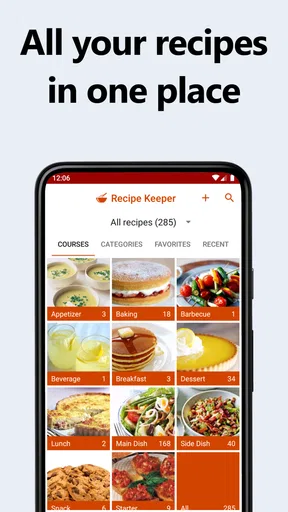
Now, I’m not the most organized person, but this app makes it so easy. You can categorize recipes into different collections and even tag them for quick access. So, whether you’re in the mood for a spicy curry or a quick weeknight pasta, you can find it in seconds. I’ve even started organizing my recipes by season, which has made meal planning a whole lot simpler.
Meal Planning and Shopping Lists
Speaking of meal planning, Recipe Keeper has a nifty feature that lets you plan your meals for the week. You can drag and drop recipes into a calendar, and it automatically generates a shopping list for you. No more scribbling lists on the back of receipts or forgetting that crucial ingredient. Just head to the store with your list in hand, and you’re all set.
Sharing is Caring
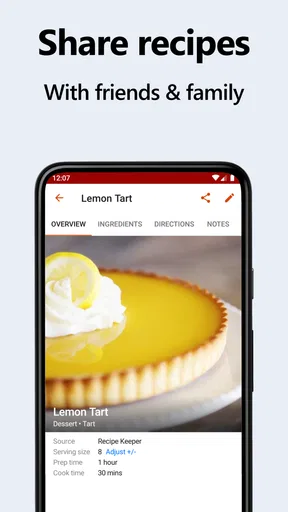
I love sharing recipes with friends and family, and this app makes it a cinch. You can share recipes via email or social media with just a few taps. It’s a fantastic way to spread the love and share your culinary creations with the world.
Backup and Sync Across Devices
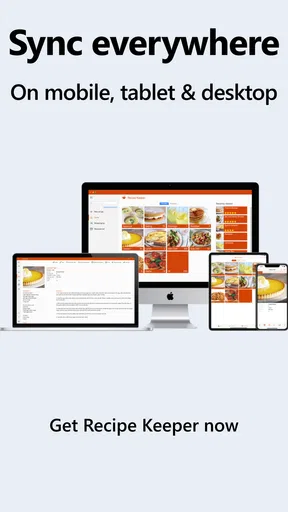
Now, I’m all about backing up my data, and this app does it beautifully. You can sync your recipes across all your devices, so whether you’re using your phone, tablet, or computer, your recipes are always within reach. Plus, knowing that your collection is backed up gives you peace of mind—no more worrying about losing your precious recipes.
Customization and Personal Touches
Finally, let’s talk about customization. You can personalize the app to match your style. Change themes, set your own categories, and even add photos to your recipes. It’s these little touches that make the app feel like it’s truly yours.
How it fits into a real cooking week
For me, the most useful test is a normal, slightly messy week rather than an idealized meal plan. On a weekend, I can choose a few recipes that suit the days ahead, then use the resulting list as a starting point for shopping. Before leaving, I check what I already have and remove those items mentally or from the list. On a rushed evening, I can open the planned recipe instead of searching through browser tabs while ingredients are already on the counter.
That workflow is especially handy when a recipe is shared within a household. One person can send a recipe to another, while the planner and list help translate “we should make this” into a practical shop. The trade-off is that everyone still needs to agree on the recipe version and any substitutions. If a cook routinely changes quantities or ingredients, noting those changes in the saved recipe is more dependable than expecting the shopping list to infer them.
How it compares with simpler options
Compared with browser bookmarks, a dedicated recipe collection gives me more structure: I can keep a recipe alongside the categories and plans that make it useful later. Bookmarks are quicker if all I need is a pointer to a page, but they do little to connect dinner ideas with a shopping routine. A notes app or paper notebook can be better for free-form cooking notes and sketches, yet it usually takes more manual work to keep meal planning and ingredients together.
Compared with recipe-discovery apps, this one places less emphasis on browsing for inspiration and more on managing dishes I have chosen to keep. That distinction matters. If I want a steady supply of unfamiliar ideas, a discovery-focused service may be a better first stop. If I already have recipes scattered across places and want to make them easier to reuse, Recipe Keeper’s combination of collection, planning, and list-making is the more relevant approach.
What to know before choosing it
The app is free to download, with in-app purchases listed at $19.99 per item, so I would check the available options in the app before relying on a particular capability as part of a long-term routine. Recipe Keeper is made by Tudorspan Limited, is rated for Everyone, and has a 4.7 average from around 18,000 ratings. It has passed one million installs, which suggests it has found a substantial audience, though popularity alone does not tell me whether its workflow suits my kitchen.
It has been available since November 10, 2014, and version 3.45.1.0 runs on Android 5.1 or later. For a new user, the practical point is to check that the device meets that requirement and to decide whether the free experience covers the way you intend to use it. If your phone is older, or if you expect a recipe app to do the organizing without any effort from you, it may be worth comparing alternatives before moving a large collection.
My practical verdict
So, there you have it! If you’re looking for a way to bring order to your culinary chaos, Recipe Keeper is worth a try. It’s easy to use, packed with features, and honestly, it’s made my life a whole lot easier. Now, if you’ll excuse me, I have a new recipe to try out. Happy cooking!
Pros
- User-friendly interface enhances navigation.
- Syncs recipes across multiple devices easily.
- Customizable categories for better organization.
- Supports various measurement units and conversions.
- Offline access to saved recipes.
Cons
- Limited free version features.
- No option for meal planning integration.
- Occasional sync delays between devices.
- Requires account sign-up for full features.
- No direct grocery list export feature.
FAQs for Recipe Keeper
What is Recipe Keeper and how does it work?
Recipe Keeper is a versatile app designed to help users organize, store, and manage their recipes all in one place. Users can easily add their own recipes, import from websites, and categorize them for easy access. The app also allows users to create shopping lists and meal plans, making it a comprehensive tool for cooking enthusiasts.
Can I sync my recipes across different devices?
Yes, Recipe Keeper offers a syncing feature that allows you to access your recipes on multiple devices. Whether you're using a smartphone, tablet, or computer, the app ensures that your recipe collection is available wherever you are, as long as you are logged into the same account.
Is Recipe Keeper user-friendly for beginners?
Recipe Keeper is designed with an intuitive interface that makes it accessible for users of all skill levels. Even if you're new to using apps for recipe management, you'll find the navigation straightforward, with clear instructions on adding and organizing your recipes efficiently.
Does Recipe Keeper support importing recipes from websites?
Yes, Recipe Keeper provides a convenient feature to import recipes directly from websites. Simply copy the URL of the recipe, and the app will automatically extract the necessary details, allowing you to save them in your personal collection without manual entry.
Are there any subscription fees for using Recipe Keeper?
Recipe Keeper offers both free and premium versions. While the free version includes essential features, the premium version unlocks additional functionalities such as cloud sync, advanced search options, and unlimited recipe storage. Users can choose to subscribe monthly or annually based on their needs.


